1 Share the workflow
Send a process, access instructions, or a recorded walkthrough.
First job aid free
Process2Docs turns workflows into screenshot-based job aids your team can follow and AI tools can read.
First job aid's on the house. If production access is not possible, choose a generic app and we'll build a sample there instead.

Clear, screenshot-based guides built for real use, not just "documentation" sitting in a folder.
16 pages - candidate flow - Sunny search through submit
End-to-end guide for applying on Workday's careers site: use Sunny to find a role, sign in or create an account, work through My Information, experience, questions, disclosures, and self-ID, then review and submit.
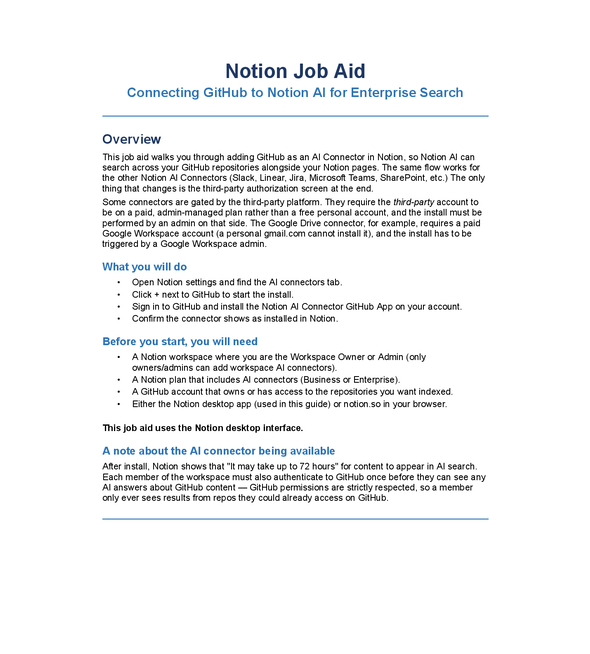
9 pages - workspace admin - connect repos for AI search
Walks workspace owners through adding GitHub as a Notion AI connector so Notion AI can search repositories alongside pages—the same pattern applies to Slack, Linear, Jira, and other connectors.
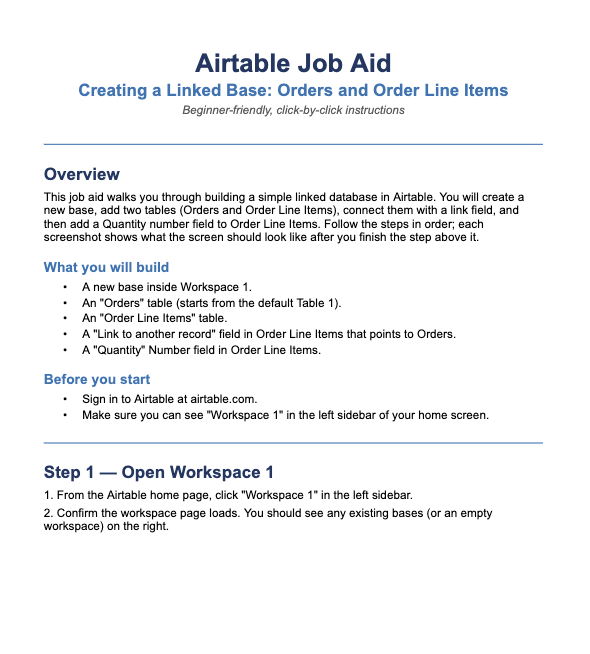
11 pages - beginner-friendly - click-by-click screenshots
Builds a small relational base from scratch: Orders and Order Line Items tables, a link between them, and a Quantity field— each step matched to what you should see on screen.
Send a process, access instructions, or a recorded walkthrough.
We click through the workflow, capture the right screens, and turn it into a clean step-by-step guide.
We make any needed tweaks for accuracy, wording, or redaction.
Ready for onboarding, SOPs, internal wikis, client handoff, and AI-assisted support.
Every guide is designed to be clear for people, structured for teams, and readable by AI tools.
Steps are matched to what users should actually see on screen, not vague process notes.
Simple workflows can often move from request to draft in a few hours.
Finished docs work for onboarding, SOPs, client handoff, and AI-assisted support.
Once you've seen the first guide, keep going with simple per-aid pricing and one revision included.
$49
Typical aid: 8-12 documented steps.
Send the task, app, and context. We'll turn it into a finished guide your team can actually use.